MAVLink tlog viewer and 3D flight replay
A .tlog is the telemetry your ground station recorded over the link — everything the aircraft reported while you were flying. RavnView replays it as a 3D flight over real terrain rather than leaving it as a stream of MAVLink messages.
Supported files: .tlog.
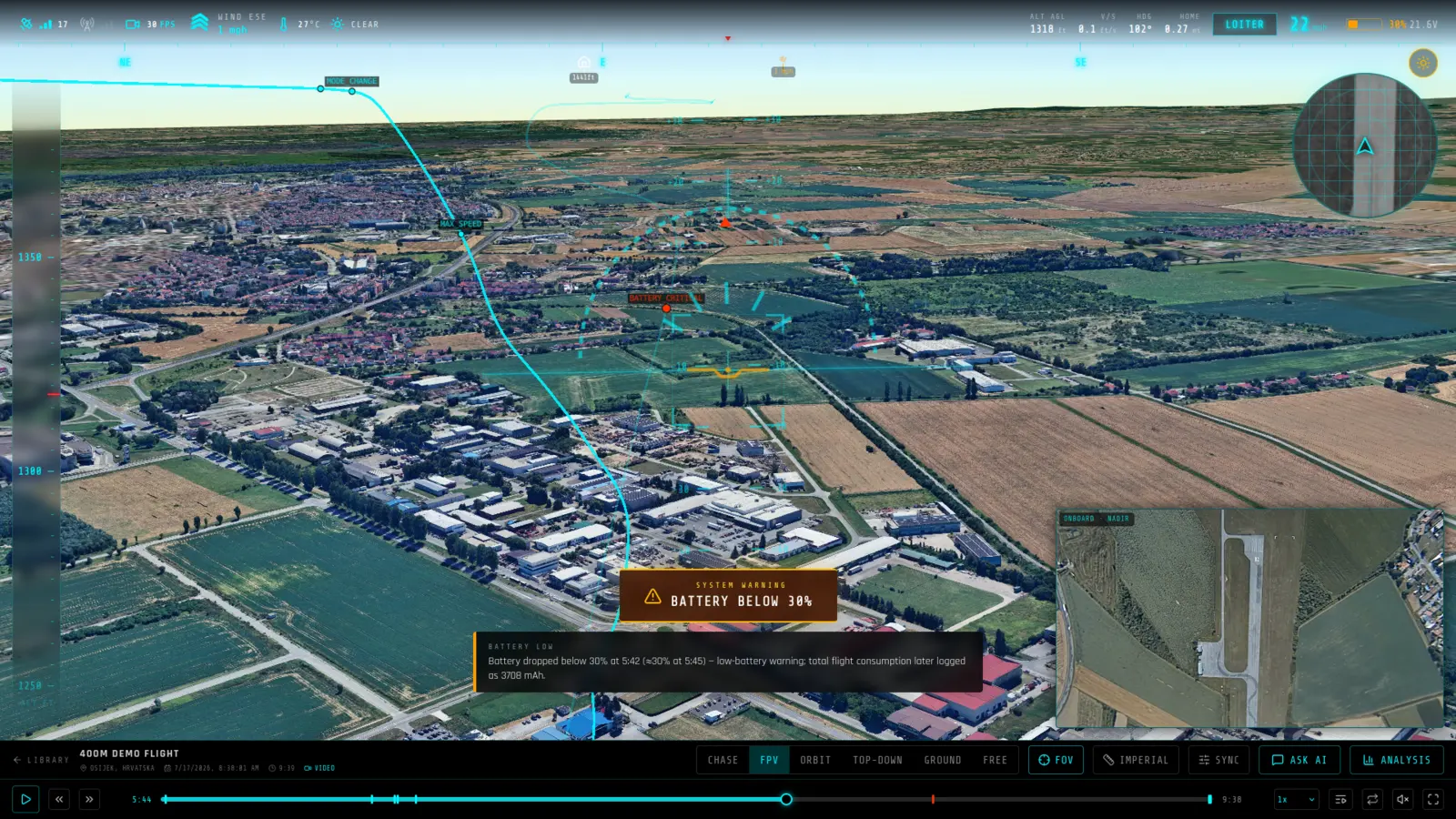
What you get from a MAVLink log
- Ground-station logs, replayed — Tlogs recorded by Mission Planner, QGroundControl or any MAVLink ground station are parsed for position, attitude, mode and system status.
- Gaps handled honestly — Telemetry links drop. Where the recording has holes the replay shows the break rather than inventing a smooth path through it — the reconstruction only ever shows what was actually received.
- Same analysis as onboard logs — Charts, the detected-event timeline, weather at the time of flight, AI commentary and PDF, CSV and KML export all work the same way as they do for dataflash and ULog files.
What RavnView reads from a MAVLink log
- GLOBAL_POSITION_INT, ATTITUDE
- Position and attitude as the vehicle reported them over the link, interpolated into a continuous flight path.
- HEARTBEAT
- Flight mode and armed state through the flight. RavnView uses the heartbeat's autopilot and vehicle type to decode ArduPilot Copter/Plane/Rover modes and PX4's packed main/sub-mode values.
- SYS_STATUS, BATTERY_STATUS
- Voltage, current, remaining capacity and the autopilot's own health bitmask.
- GPS_RAW_INT, EKF_STATUS_REPORT
- Fix quality, satellite count and the EKF's reported variances — the pair that separates a GPS problem from an estimator problem.
- RC_CHANNELS, SERVO_OUTPUT_RAW
- Pilot inputs and the outputs the autopilot produced from them, on the same timeline as everything else.
- VIBRATION, RAW_IMU, SCALED_IMU
- Vibration levels and inertial data at whatever rate the link carried them.
- STATUSTEXT, AUTOPILOT_VERSION
- The vehicle's own messages and the firmware that produced them, which is how a tlog identifies the aircraft it came from.
Limits worth knowing
- A .tlog is the ground station's recording of a radio link, not the onboard log. It carries whatever the link had bandwidth for — much lower rate and much less complete than an ArduPilot .bin or a PX4 ULog covering the same flight.
- Dropouts in the telemetry link appear as gaps in the recording. The replay interpolates across short ones and shows the longer ones for what they are, rather than inventing a track through them.
- If you have the onboard log for the same flight, upload that instead. A tlog is the right choice when the radio recording is all that survived.
Frequently asked questions
- Is a tlog as good as an onboard log?
- It depends on your link. A tlog only contains what got through the radio, usually at a lower rate than the onboard log, so a dataflash .bin or ULog will be more complete when you have one. For flights where the tlog is all you kept, it is enough to reconstruct the flight.
- Which autopilots does this cover?
- Any autopilot speaking MAVLink, which in practice means ArduPilot and PX4 vehicles recorded through a ground station.
- Is a .tlog the same as an ArduPilot .bin?
- No. A .bin is written on the flight controller at full rate; a .tlog is recorded by QGroundControl or Mission Planner from the telemetry stream. They can describe the same flight at very different levels of detail.
- My file has no .tlog extension — will it still work?
- Probably. Each packet in a tlog is prefixed with an eight-byte timestamp, so the MAVLink start byte lands at a predictable offset and a misnamed or extensionless file can be recognised by content.
- Do I need to install anything?
- No. RavnView runs entirely in the browser — you upload a log file and the replay loads in the same tab. There is no desktop application and nothing to keep updated.
- Is it free?
- Yes, to start. The free tier covers 2 GB of storage, 2 flights and 20 AI questions per month, and does not ask for a card. Paid plans raise those limits; every plan includes the full replay and analysis toolset.
- Are my flights public?
- No. Flights are private by default and only visible to you. You can make an individual flight public, which produces a shareable link anyone can open without an account.