DJI flight log viewer and 3D replay
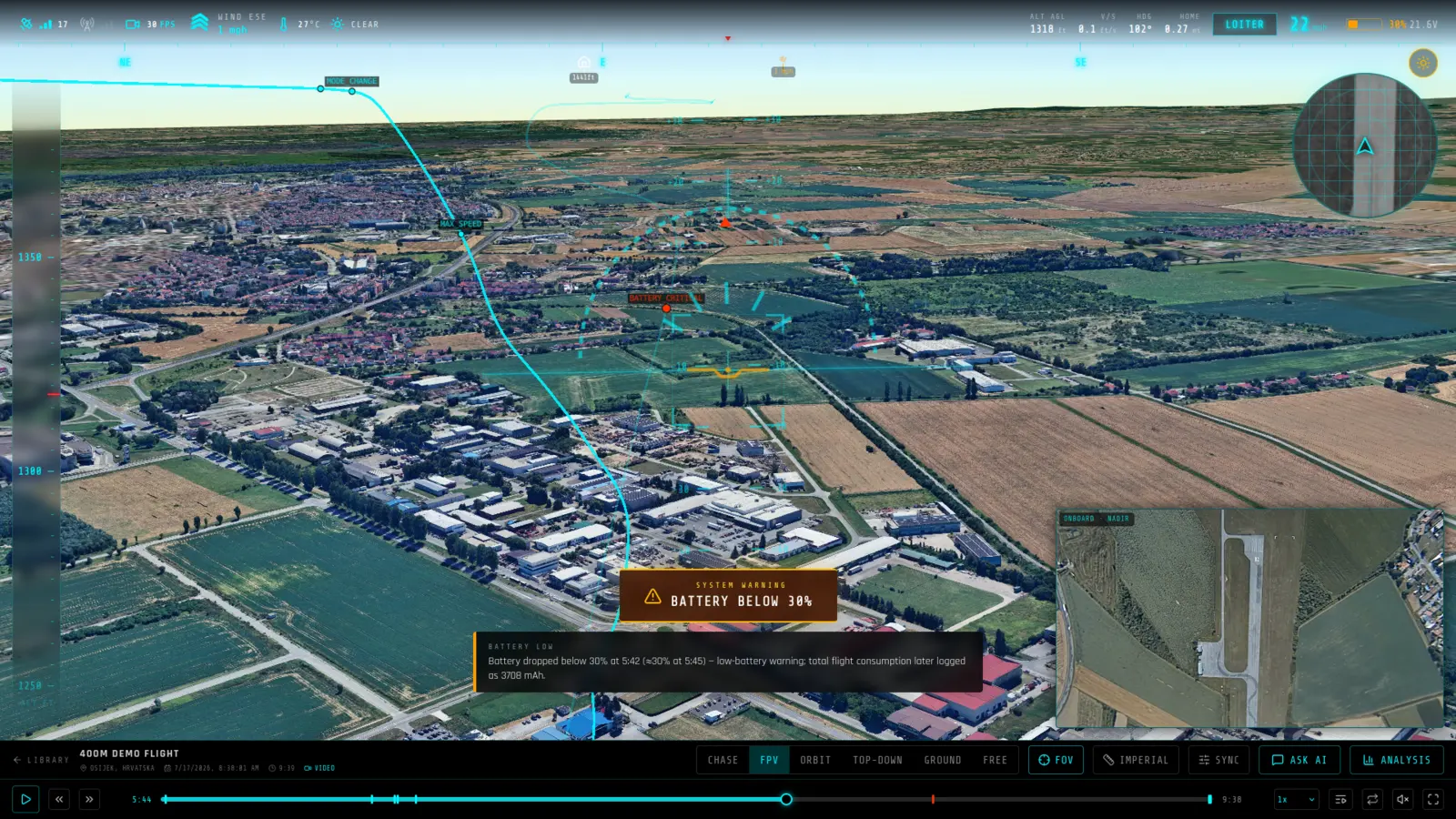
Take the flight record your DJI Fly app saved and turn it into a replay you can actually watch: the aircraft flying its recorded path over real terrain, with your onboard video running in sync beside it.
Supported files: .txt.
What you get from a DJI Fly log
- Encrypted records supported — Flight record versions 13 and later are AES-256 encrypted — effectively every log the current DJI Fly app writes. RavnView decrypts them server-side, so you get full per-frame telemetry, not just header metadata.
- Your video, locked to the telemetry — Add the onboard video and it rides along as picture-in-picture, locked to the replay clock frame by frame, so what you see matches what the aircraft was doing.
- Where the flight actually went — Altitude, speed, distance from home, battery and signal are charted against the replay, with a map view and an event timeline covering the whole flight.
What RavnView reads from a DJI Fly log
- OSD frames
- The per-frame flight record — position, altitude, speed, attitude and aircraft state at roughly 9–10 Hz, which is what the 3D replay is reconstructed from.
- Header metadata
- Aircraft model, start point and the aggregate stats DJI writes at the top of every record. This is readable from any version of the format, with or without a decryption key.
- Arm and disarm state
- Motor state transitions across the record, marked on the timeline alongside the rest of the detected events.
Limits worth knowing
- Records from version 13 onwards — effectively every log the DJI Fly app writes today — are AES-256-CBC encrypted and need a per-flight decrypt against DJI's own keychain API. Without a DJI Developer key configured, only the header metadata is readable: aircraft info, start point and aggregate stats, with no frame-by-frame track and therefore no replay.
- Versions 1 to 12 decode fully offline. Those older records use a single-byte record length rather than the two-byte field later versions use, which is handled directly rather than through the upstream library's record loop.
- The .txt extension is misleading: these are proprietary binary files despite the name. Upload them exactly as the DJI Fly app wrote them — opening and re-saving one in a text editor will corrupt it.
A real DJI Fly flight
DJI Mini 2 (2021 Kirkland) — DJI Mini 2 · Bremerton, United States · 20m 54s. A public DJI Fly log in RavnView: telemetry summary, detected events, weather at the time, and the interactive 3D replay, with no account needed to open it.
Frequently asked questions
- Where do I find my DJI flight records?
- The DJI Fly app stores them on the phone or tablet you flew with, under the app's FlightRecord folder. Copy the .txt file off the device and upload it — no cable to the aircraft needed.
- My log is from 2021 or later. Will it work?
- Yes. Those records are encrypted, which is why many offline viewers only show partial data. RavnView decrypts them and reads the full per-frame telemetry.
- Which DJI aircraft has this been tested against?
- Real records from a 2021 DJI Mini 2, a 2024 DJI Mini 4 Pro and a 2019 Phantom 4 Pro V2 recorded by DJI GO 4. The first two are the modern encrypted format; the Phantom record is the older offline format, and all 9,405 of its frames decode.
- Where do I find the flight record on my phone?
- The DJI Fly app stores them on the device that flew the aircraft, under its own app folder. Copy the .txt file off the phone or tablet and upload it as-is.
- Do I need to install anything?
- No. RavnView runs entirely in the browser — you upload a log file and the replay loads in the same tab. There is no desktop application and nothing to keep updated.
- Is it free?
- Yes, to start. The free tier covers 2 GB of storage, 2 flights and 20 AI questions per month, and does not ask for a card. Paid plans raise those limits; every plan includes the full replay and analysis toolset.
- Are my flights public?
- No. Flights are private by default and only visible to you. You can make an individual flight public, which produces a shareable link anyone can open without an account.